
Configuring a URL migration to a new domain to take effect after a specific date and hour
Configuring scheduled URL migrations on NetScaler can be fully automated and predictable if you treat redirects as data, not one-off rules. This guide keeps your original technical steps intact, while framing them as a reusable pattern for controlled, time-based cutovers to a new domain.
*Note: The code in this blog is publicly available on GitHub.
Step 1: Configure the String map
Use a String map to hold all URLs planned for migration and the date-time after which the policy should evaluate as TRUE for each URL. Because URLs are case-sensitive, every key is stored in lowercase to standardize matching and avoid missing variants entered by users with different casing.
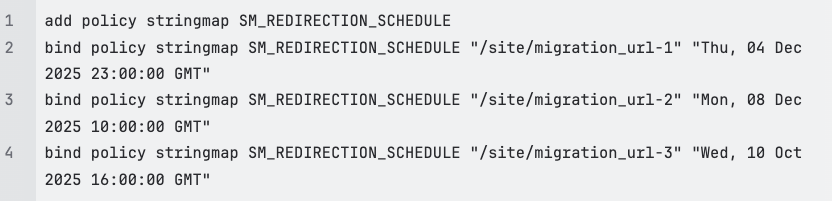
In this example we plan the migration of each URL at a different date and hour. If NetScaler runs in CET (GMT+1) and the condition evaluates to TRUE, the redirect will take effect after these local times:
migration_url-1: Friday 5 December, 00:00 CET
migration_url-2: Monday 8 December, 11:00 CET
migration_url-3: Wednesday 10 October, 17:00 CET
Step 2: Define the Pattern set
The responder policy needs a list of URLs that are planned for migration, which you define in a Pattern set. As with the String map, all entries are stored in lowercase so they align with the normalized request URL used later in the expression.

Step 3: Create the responder action
Define a responder action that redirects the client to the new domain while preserving the full original path and query string.

By appending HTTP.REQ.URL, the complete client URL (including any deeper path segments) is kept intact on the new domain, independent of the lowercase entries used in the Pattern set or String map.
Step 4: Add logging for observability
Attach a log action so every migration event is traceable with timestamp and requested URL.

This makes it easier to validate that redirects start exactly at the configured time and to correlate behavior with other ADC or backend logs.
Step 5: Build the responder policy
Because all keys in the Pattern set and String map are stored in lowercase, the request URL must also be normalized to lowercase for matching. The Responder Policy below evaluates hostname, path membership, regex extraction, and time comparison against the String map value:
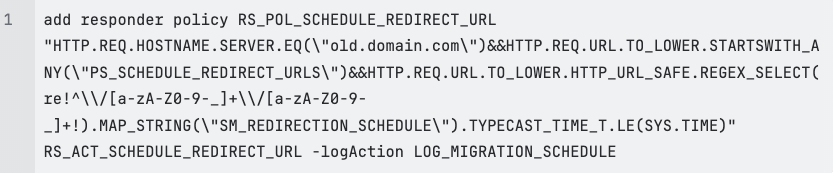
The regex extracts the /path/page portion of the URL and checks if it exists as a key in the String map, using only characters in [a-zA-Z0-9-_] (you can extend this set if your URLs require additional characters). For example:
a-z
A-Z
0-9
…
When is the policy TRUE?
The policy evaluates as TRUE only when all of the following apply:
The requested hostname is old.domain.com
The requested URL (lowercased) is present in the Pattern set PS_SCHEDULE_REDIRECT_URLS
That same normalized URL exists as a key in the SM_REDIRECTION_SCHEDULE String map
The current NetScaler local time is later than the time stored for that key in the String map
When all conditions are met, the policy triggers the redirect action and writes a log entry through LOG_MIGRATION_SCHEDULE.
Performance and case-sensitivity notes
Regex processing in responder expressions can increase Packet CPU usage, especially in high-traffic environments where many requests match the policy conditions. Test the policy in a lower-traffic or staging environment first, and monitor CPU impact before rolling out widely.
By default, the policy logic described here processes incoming URLs in lowercase, so any Pattern set or String map referenced by the policy must also use lowercase entries to match correctly. If you prefer to keep original casing in expressions, you can remove TO_LOWER, but then you must define every relevant case variation for each path you want to match.
Turn this into a repeatable migration pattern
If you want this scheduled URL migration pattern implemented, reviewed, or extended for a larger domain cutover, Blubyte can help you design, test, and deploy it safely across your NetScaler environments. Reach out via the Blubyte contact page or schedule a short technical session directly (click here) and validate your migration plan before your next go-live window.