
Stop malicious traffic earlier: using TLS SNI on NetScaler to block attacks before AAA and WAF
Before WAF is enabled
Information retrieved from NetScaler logs:
10.20.30.40 -- 12/13/2025:22:45:22 GMT NSVPX 0-PPE-0 : default SSLVPN Message 3262118 0 : "AAA Client Handler: Found extended error code 1245208, ReqType 16388 request /nf/auth/doAuthentication.do"10.20.30.40 -- 12/13/2025:22:45:24 GMT NSVPX 0-PPE-0 : default AAATM Message 1263498 0 : "LOGINSCHEMA VALIDATION ERROR : username sent in login request when schema does not define it, schema LS_MFAnotification lags 4100"
From these NetScaler logs you can see an external connection attempt that triggers an error, but the original source IP is not visible in this first stage.
The activity already reaches the SSL VPN and AAA (Authentication, Authorization and Auditing) modules, which means resources are consumed before the request is rejected.
To mitigate this, you can enable the Web Application Firewall (WAF) on the NetScaler so that malicious requests are stopped before they ever hit SSL VPN or AAA.
After WAF is enabled
Information retrieved from NetScaler logs:
10.20.30.40 -- 12/13/2025:23:52:33 GMT NSVPX 0-PPE-0 : default APPFW APPFW_DENY_LIST 5075206 0 : 188.128.86.74 19462706-PPE3 - ns-aaa-default-appfw-profile https://1.1.1.1/p/u/doAuthentication.do Deny List check Match EXP_BLOCK_AAA_URLS - EXPR <blocked>10.20.30.40 -- 12/13/2025:23:55:56 GMT NSVPX 0-PPE-0 : default APPFW APPFW_SCHEMA_VALUE_INCORRECT 5613741 0 : 188.128.86.74 19555083-PPE2 - ns-aaa-default-appfw-profile Parameter value incorrect as per API Spec: (ns-aaa-spec) for Endpoint: (GET https://1.1.1.1/logon/LogonPoint/tmindex.html) <blocked>
With WAF enabled, the same type of request is now blocked by deny‑list checks or API specification violations, and the attacker’s source IP is clearly logged.
This is already a strong security posture: vulnerable requests are blocked and detailed events are written to the NetScaler logs for incident response and tuning.
Is this enough protection?
The examples above show that WAF is doing its job, but all of this still happens after the TLS handshake is completed and HTTP data is being exchanged.
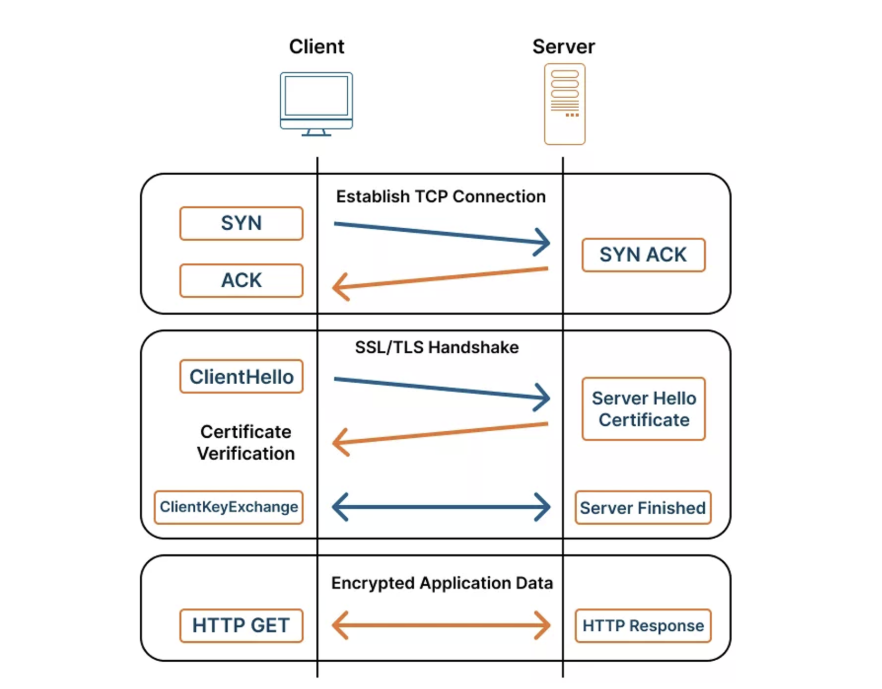
Diagram illustrating a secure HTTPS connection, showing the TCP three-way handshake, the SSL/TLS handshake (ClientHello, ServerHello, certificate exchange), and the subsequent encrypted HTTP communication between client and server.
That means CPU‑intensive crypto operations are already performed and higher OSI layers (like AAA, WAF and BOT Management) are involved before traffic is dropped.
Ideally, you want to reject obviously invalid or unwanted requests even earlier in the flow to save resources and shrink your attack surface.
NetScaler offers several Layer‑7 controls, WAF, BOT Management and HTTP Responder policies, but all of them rely on a completed TLS session.
So what can we do one layer earlier?
Using TLS SNI as an early security filter
Server Name Indication (SNI) is a TLS extension that lets the client send the hostname it wants to reach inside the ClientHello message, before the encrypted session is fully set up. This allows a single IP address to host multiple sites with different certificates and, more importantly for security, exposes the requested hostname early in the connection so it can be allowed or blocked.
SNI has been widely supported for many years and is standard in all modern browsers and operating systems. On NetScaler, you can enable SNI on SSL profiles or directly on the SSL virtual server and bind one or more SNI certificates to match specific hostnames.
In short: using SNI, NetScaler can decide to continue or drop a connection before expensive crypto and higher‑layer inspection kick in.
Enforcing SNI on NetScaler (example)
A minimal configuration to enforce modern TLS and SNI on a Citrix Gateway vServer could look like this:
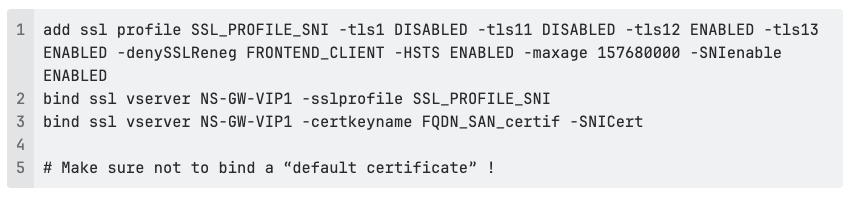
Example NetScaler SSL configuration, showing an SSL profile with TLS 1.2 and TLS 1.3 enabled, HSTS enforced, SNI support configured, and a SAN certificate bound to a virtual server to ensure secure client connections.
NetScaler will now use the SNI information from the ClientHello to select the correct certificate and can immediately reset connections that present an unknown or invalid hostname, before the TLS handshake completes.
Because this decision happens earlier in the OSI stack, no cryptographic processing is wasted on obviously bad traffic, which reduces load and helps mitigate automated scanning and abuse more efficiently.
By combining WAF, BOT Management and HTTP responder policies with smart SNI enforcement, you stop malicious requests as early as possible, turning your Citrix Gateway into a lean, proactive security front door instead of a reactive filter.
Would you like more information or help, Blubyte is here for you with expert advice, contact us.
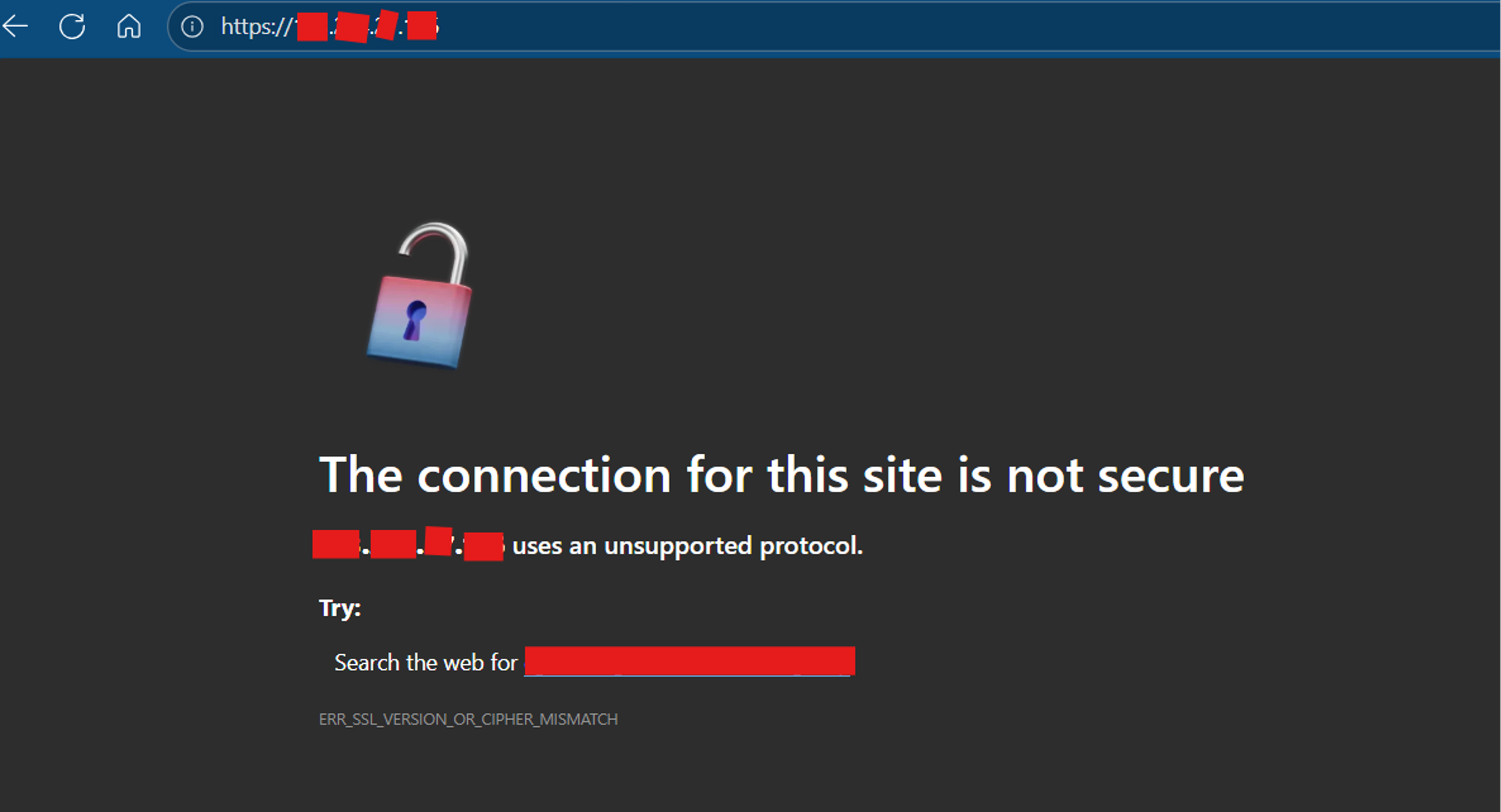
Browser security warning indicating an insecure HTTPS connection, showing an SSL/TLS protocol or cipher mismatch error caused by an unsupported or misconfigured encryption setup on the server.