
SDX cross platform migration
A Clear Guide for Citrix NetScaler VPX on SDX Appliances
Migrating a Citrix NetScaler VPX (formerly ADC, now Citrix NetScaler) instance across SDX appliances, commonly known as SDX cross-appliance migration, is essential for hardware refresh, support continuity, and configuration optimization. This blog guide provides a structured, practical workflow to ensure a smooth and low-risk transition.
Recommended migration workflow
- Prepare the Target SDX Appliance
Ensure the new SDX appliance matches the firmware/software version of the source unit for compatibility. - Full Backup
Back up the source SDX completely, including all configurations, SSL certificates, and system files. - VPX Restoration via HA Failover
Use the high-availability (HA) failover migration method to restore the VPX instance onto the new appliance. - Validate Network Settings
Confirm network parameters, such as SNIPs, VIPs, and routing and especially when the new appliance resides on a different network segment. - Cutover during Maintenance Window
Schedule and execute the cutover by failing over the VPX and activating the new SDX appliance. - Test Thoroughly and Rollback if Needed
Conduct comprehensive tests to verify service integrity. Be prepared to rollback to the prior configuration if issues arise.
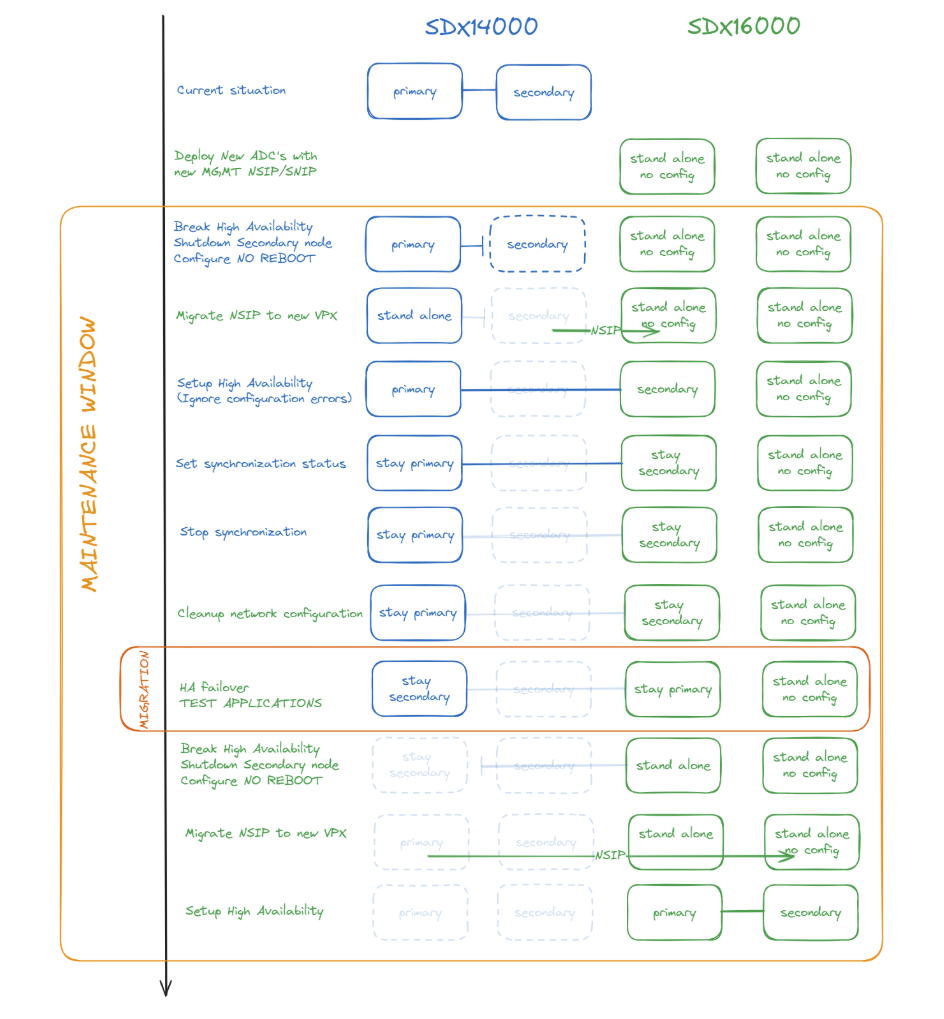
Diagram for the migration approach
Real-World Best Practices
From field experts and Citrix forums, key recommendations include:
- Clean configuration files before migration by removing appliance-specific details like NSIP, SNIP, and MAC addresses. Clearing ARP tables on connected switches is also advised.
- Use the HA state
STAYSECONDARYto quietly import configurations before the official cutover. - Match firmware versions on both VPX and SDX to avoid configuration mismatches or errors.
Migration Checklist by Phase
Phase 1: Pre-migration
Step 1: Deploy new SDX, ensure same software/firmware version between SDX appliances.
Step 2: Configure SVM networking.
Step 3: Apply licensing.
Step 4: Deploy new VPX (same FW build as the old one) with new NSIP.
Pahse 2: Backup
Step 5: Backup up old SDX.
Step 6: Backup up old VPX before the migration.
Pase 3: Start-migration
Step 7: Break the HA and remove old VPX secondary node
Step 8: Shutdown old VPX secondary node and configure no reboot from the XenServer
Step 9: Reassign NSIP from old secondary to new VPX
Step 10: Form an HA pair between the old primary VPX (SDX14000) and the new VPX (SDX16000)
Phase 4: Network validation
Step 11: Check the log file at /var/nssynclog/sync_batch_status.log for errors on new VPX secondary node
Step 12: The interface-related settings might generate errors. Manually fix the bind vlan and set interface configurations.
Step 13: If any other errors are found, manually address them.
Phase 5: Cutover & Testing
Step 14: Enable HA sync and propagation
Step 15: Initiate force ha sync
Step 16: Do a failover, test your services, and rollback if necessary.
Step 17: Start next HA node when the business confirms that the new VPX is working as expected
Advantages of SDX Cross‑Appliance Migration
1. Hardware Refresh & Support Continuity
- Migrating to newer SDX models ensures continued support and access to the latest hardware optimizations. As older NetScaler MPX/SDX hardware reaches end‑of‑support, updating becomes essential for reliability and compliance.
2. Consolidation & Efficiency
- Deploying services on new SDX appliances provides an opportunity to clean and consolidate configurations, eliminating legacy cruft.
- Tight consolidation can lead to better resource allocation and streamlined operations.
3. Opportunity for Cleanup and Improvement
- Migration forces a review of existing configurations—SSL certs, ns.conf, VIPs, SNIPs, etc.—offering a chance to reallocate, reorganize, and clean up configurations.
4. Reduced Risk Through Phased Migration
- A controlled, service-by-service or HA‑based approach allows for a smoother migration with fallbacks. This is seen as the “least disruptive and least risky” for the business.
Challenges and Considerations
1. Downtime and Operational Risk
- Migration can entail service interruption. Without careful planning (e.g., staging or phased approach), it may result in extended downtime.
- Complex configurations increase the risk of failure during migration.
2. Compatibility & Configuration Discrepancies
- New firmware (e.g., NetScaler 13.1) may deprecate legacy features like classic policies or portal themes. Configurations relying on deprecated elements may break.
- Migrations across different network segments (management or data) do not automatically port routing rules; these must be recreated manually.
3. HA and Clustering Limitations
- Clustering across heterogeneous environments, especially mixing hardware or virtual platforms, is unsupported and unreliable.
4. Certificate and File Transfer Complexities
- SSL certificates, service-specific keys, and custom configurations in /nsconfig/ssl or ns.conf must be carefully transferred. A reboot that saves an unintended config may overwrite migrated settings.
5. Limitations in Support and Troubleshooting
- While Citrix support provides valuable assistance, its responsiveness and effectiveness can vary. Organizations undertaking complex migrations may benefit from supplementing it with additional resources.
Final Thoughts
Cross-appliance migration on the Citrix SDX platform offers a prime opportunity for hardware renewal and configuration improvements. Success hinges on detailed planning, compatibility checks, and strong rollback strategies. Importantly, Citrix officially supports the HA failover migration method, providing a reliable path for businesses to modernize safely.
For deeper insights on supported hardware and migration specifics, refer to Citrix official documentation:
Migrate the configuration of a NetScaler instance across SDX appliances
Need tailored migration support?
Whether it’s risk mitigation, scheduling, or rollback planning, Blubyte’s seasoned experts are ready to craft a migration strategy unique to your infrastructure.
Get in touch to schedule a direct consultation with our top Citrix NetScaler specialists.