
The next NetScaler CVE is not a question of if, but of when. And the time you get to react is shrinking fast.
Over the past weeks we once again patched NetScaler appliances across the board: new firmware where possible, custom responder policies as a temporary mitigation where not. Plenty of articles already explain what those vulnerabilities are and how to fix them. This post is about something else: how to make sure the next one doesn't catch you off guard.
The response window is closing
Not so long ago, there were often days or even weeks between the publication of an advisory and the first mass exploitation. That buffer is gone. With CitrixBleed 2 in 2025, exploitation started within days of disclosure, and several NetScaler bugs since have been exploited as zero-days before a fix even existed.
AI accelerates this further. Attackers now use it to diff firmware releases, understand a patch and turn it into a working exploit in hours rather than weeks. Scanning the entire internet for exposed Gateway and AAA virtual servers has been trivial for years. Put the two together and the gap between "advisory published" and "your appliance is being probed" can be measured in hours.
That has a very practical consequence: there is no time to wait until Monday. If an advisory drops on a Friday evening, you cannot afford to wait for the next change advisory board, track down who is allowed to approve an emergency change, or find out which colleague still has the management credentials. The decisions need to be made before the CVE exists. That is what preparing for the next one means.
Change management: decide before the CVE exists
The slowest part of most emergency patches is not the technical work. It is the waiting: for approval, for the right people, for a maintenance window.
Pre-approved runbooks per severity
Agree with management and your CAB, in advance, what you are allowed to do for which type of vulnerability. Base it on the CVSS score, but also on the characteristics that really matter: is it exploitable without authentication, is it exposed on Gateway or AAA virtual servers, is it already in the CISA KEV catalogue or actively exploited?
An example of how such a matrix could look:
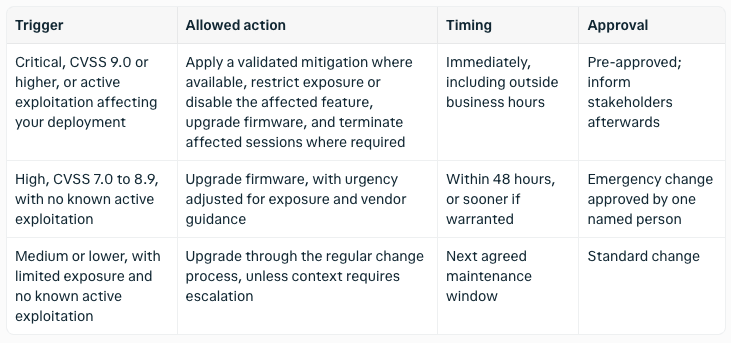
The runbook behind each row should be concrete: which steps, in which order, how to validate, and how to roll back. When the advisory lands, the only decision left is which row applies.
Keep contacts up to date
Make sure everybody knows who to call, and that those numbers actually work at 22:00 on a Saturday. That list includes:
the people who decide (the owner of the pre-approval, the security officer, the CISO)
the people who execute (NetScaler admins, network and firewall team, the SOC)
the people who need to be informed (service desk, business owners, communications if users will be disconnected)
external parties: your MSP, Citrix/Cloud Software Group support with your contract number at hand, and your incident response retainer if you have one
Also check that you receive the advisories yourself. Subscribe to the Citrix security bulletins and follow your national CSIRT, so you do not learn about a critical CVE from LinkedIn.
Align with your MSP
If an MSP manages your NetScalers, discuss today how they handle a critical CVE.
Who monitors the advisories, and who decides to act? Are they allowed to patch or mitigate without waiting for your approval, and within which SLA? Do they have 24/7 access and the credentials they need? How and when will they report back?
Write the answers down. A shared, signed-off runbook between you and your MSP avoids the worst possible scenario: both parties waiting for the other to make the first move.
Technical readiness: move fast and look back
A good runbook only helps if the environment lets you execute it quickly, and if you can find out afterwards whether you were hit before you patched.
Know what you have
You cannot patch what you do not know exists. Keep an inventory of every NetScaler instance, including the forgotten ones: the DR pair, the lab VPX, the appliance a project team deployed three years ago. For each one, record the firmware version, the HA partner, which features are enabled (Gateway, AAA, load balancing only) and which virtual servers are reachable from the internet. NetScaler Console (formerly ADM) can do much of this for you.
Stay on a supported firmware release
Fixes are only released for supported builds. If you are still on an end-of-life release, a critical CVE suddenly becomes a major upgrade project instead of a routine patch. Keep your appliances on a current release train, and stay reasonably close to the latest build so the jump is small when it matters.
Make patching and mitigation routine
The fastest emergency upgrade is one you have done many times before. Document and test your HA upgrade procedure, including rollback, and keep a recent config backup and known-good snapshot of every instance. If you manage many appliances, automate: push firmware and responder policies via NetScaler Console, Ansible or the NITRO API, so a mitigation reaches all instances in minutes instead of being clicked in one by one. A small lab appliance lets you validate a new build or responder policy before it touches production.
Logs: exported, retained and searchable
Many NetScaler compromises are only discovered weeks later, and by then the local logs on the appliance have long been rotated away. Export syslog and audit logs to a central location or SIEM, with enough retention to look back at least several months. Make sure they are searchable, so you can quickly answer the questions that matter after a disclosure: which IP addresses hit the vulnerable endpoint, were there unusual requests or crashes, did sessions appear from unexpected locations? Also keep in mind that a compromised appliance can tamper with its own logs, which is one more reason to ship them off the box.
Prepare for IP blocking
During an active exploitation wave, you will want to block known malicious IP addresses, often from threat intel feeds that update several times a day. Decide in advance where you will do this: on the firewall in front of the NetScaler, on the NetScaler itself with a responder policy and a pattern set or ACLs, or at an upstream DDoS or WAF provider. Prepare the mechanism now, so that blocking a list of addresses is a matter of updating a feed, not of writing new configuration under pressure. Consider whether geo-blocking makes sense for countries where none of your users are located.
Reduce the blast radius
Assume that one day a NetScaler will be compromised, and design so that this hurts as little as possible.
Split roles across instances. With Optimal Gateway Routing in StoreFront, the HDX/ICA traffic can be routed through a different Gateway than the one that handles authentication. That way AAA and ICA proxy can live on separate instances. A vulnerability in one role does not automatically expose the other, and you can take one instance offline or patch it without losing everything.
Keep the management interface off the internet. NSIP and management access on SNIPs should only be reachable from a dedicated management network, ideally via a jump host.
Limit what the NetScaler can reach. Restrict outbound traffic from the appliance to what it really needs: authentication servers, back-end services, logging. An appliance that cannot freely talk to the internet makes it harder for an attacker to download tools or set up a reverse shell. Also limit east-west access so a compromised NetScaler is not a free pass into your network.
Disable what you do not use. Every enabled feature and exposed virtual server is attack surface. Many recent CVEs only affect appliances configured as Gateway or AAA virtual server.
After patching: clean up
Patching closes the door, but does not remove someone who is already inside. Prepare the post-patch steps as part of the runbook:
Terminate all existing sessions (ICA, AAA, PCoIP, RDP), as session tokens stolen before the patch may still be valid.
Run a compromise assessment: check for web shells, unexpected files, cron jobs or configuration changes. Use the IOC scanners and hunting guides that Citrix and security vendors publish for most major CVEs.
Rotate secrets stored on or passing through the NetScaler when compromise cannot be ruled out: LDAP bind accounts, service accounts, RADIUS secrets and certificates with their private keys.
If you find signs of compromise, do not try to clean the appliance. Rebuild it from a fresh image and restore a verified configuration. Make sure you know how to do this before you need to.
Practice it
A runbook that has never been used is a theory. Run a short tabletop exercise once or twice a year: take a recent NetScaler CVE, pretend the advisory came out on Friday at 18:00, and walk through it with everyone involved, including your MSP. Who gets the alert? Who decides? How long until the mitigation is live on every instance? Where do you search the logs? The gaps you find in a meeting room are much cheaper than the ones you find during a real incident.
To get started, here is a checklist you can go through this week:
Pre-approved runbooks per severity level, signed off by management
Contact list verified, including out-of-hours numbers and vendor support details
Responsibilities and SLAs agreed with your MSP
Subscribed to Citrix security bulletins and your national CSIRT
Complete inventory of all NetScaler instances, versions and exposed services
All instances on a supported firmware train
HA upgrade and rollback procedure tested, config backups available
Logs exported to a central, searchable location with sufficient retention
IP blocking mechanism prepared and tested
Management interfaces unreachable from the internet
Outbound and east-west traffic from the NetScaler restricted
Roles split where it makes sense (Optimal Gateway Routing for AAA vs. ICA)
Post-patch steps documented: kill sessions, compromise assessment, secret rotation, rebuild
Tabletop exercise scheduled
The next one is coming
NetScaler sits at the edge of your network and handles authentication for your users, which makes it one of the most attractive targets there is. There will be another critical CVE, and the time between disclosure and exploitation will only get shorter.
You cannot control when that happens. What you can control is how ready you are: decisions made in advance, the right people reachable, logs you can search, blocking you can switch on, and an architecture that limits the damage. The organisations that came through the last waves unharmed were rarely the lucky ones. They were the prepared ones.
Book a technical call with a Blubyte expert to identify what needs fixing now, so your team can act when the next CVE arrives.