
Proactive NetScaler LAS Monitoring: How to Avoid Licensing Outages
With Citrix’s recent changes to NetScaler product licensing, the licensing layer has become a critical component of every NetScaler deployment. This article focuses specifically on NetScaler licensing with the License Activation Service (LAS) using the NetScaler Console and excludes CVAD and other Citrix products.
Citrix designed LAS with built‑in grace periods and resiliency, which is positive for most environments.
However, for some organizations, a 30‑day grace window is not sufficient once you factor in internal processes, change management, and potential interaction with Citrix Support. That makes it essential to detect and act on anomalies across the full chain of LAS components as early as possible.
As a managed services provider for NetScaler, Blubyte manages and proactively monitors a large number of NetScaler environments.
For us, comprehensive monitoring of all LAS components is mandatory to ensure a robust availability and compliance posture.
LAS architecture recap
Before we dive into concrete monitoring and alerting options, it is useful to recap the LAS components involved. For the purposes of this article, we focus on online LAS scenarios and exclude offline LAS workflows.
In a typical on‑premises NetScaler Console deployment, the flows look like this (see diagram):
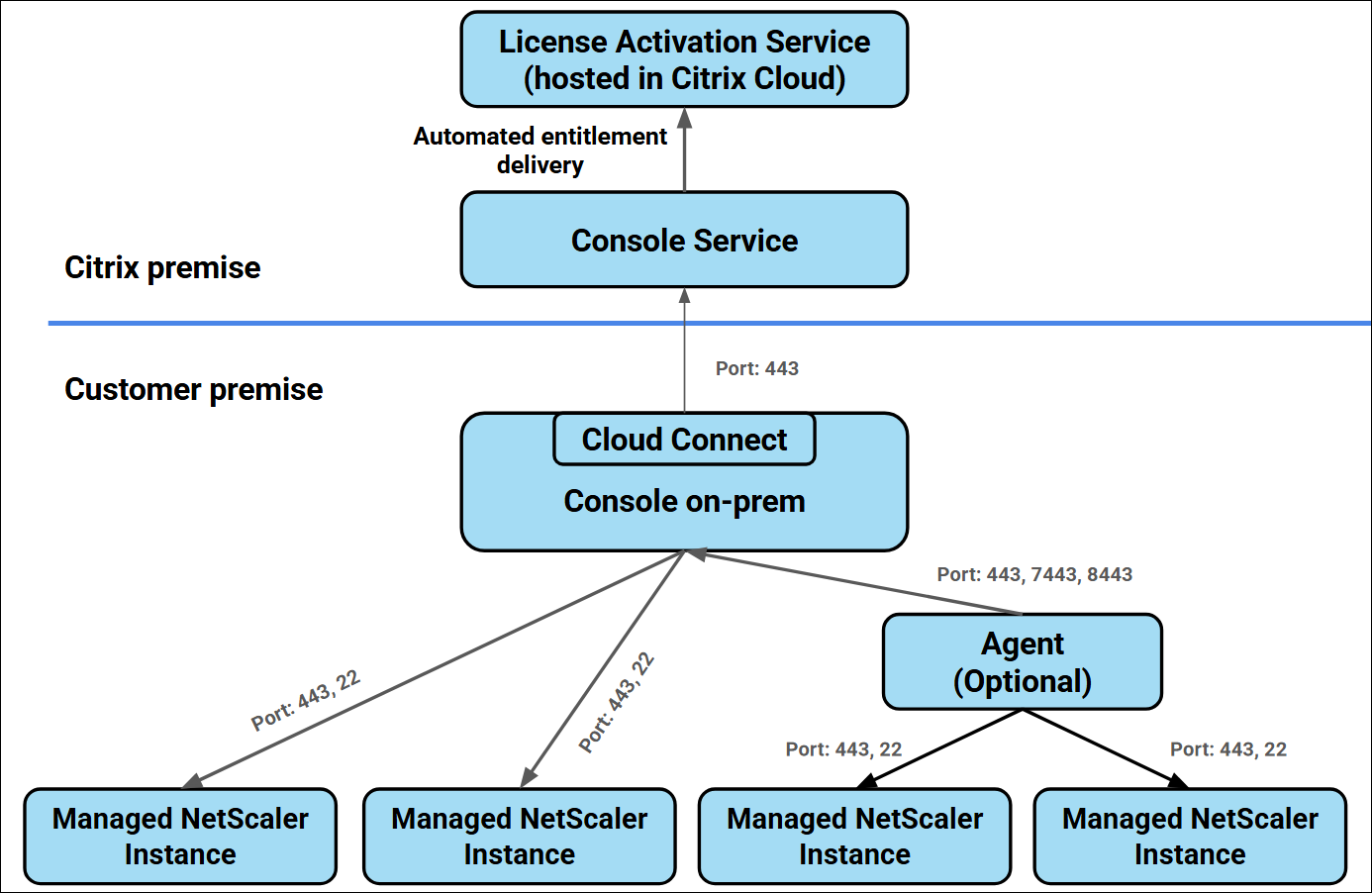
Typical on‑premises NetScaler Console deployment flows
Most LAS deployments will be using an on premises NetScaler Console instance where there are two main integrations:
NS Console connects to Citrix Cloud (LAS Service and Citrix backoffice) to retrieve entitlements
NetScaler instances (or SDX SVM) connect to NS Console to retrieve licensing blobs.
Both flows have a grace period in case of connectivity issues.
Monitoring & Alerting NetScaler instances
We will examine each component from the bottom up, describe its role in LAS, and outline practical monitoring approaches. In many cases, there are multiple options available, pull‑based (for example, via the Nitro API) and push‑based (such as SNMP traps). Our managed services platform primarily leverages the Nitro API, but you should select the method that best aligns with your tooling and operational model.
NetScaler Instances
Each NetScaler instance must be monitored individually. For example, an NS Console instance could be powered off or otherwise unavailable without generating native alerts if not explicitly monitored.
Note: NetScaler instances running on SDX will always appear as licensed because LAS licensing for those instances is handled by the SDX SVM.
Functionality:
NetScaler instances receive a license blob from the on‑premises NS Console that is valid for 30 days. This license blob is refreshed every 8 hours.
If a NetScaler instance cannot reach the on‑premises Console for 3 consecutive attempts within a 24‑hour period, it enters a 30‑day grace period.
On day 31, the NetScaler instance will reboot, become unlicensed, and effectively stop providing services.
The NS Console dashboard displays a warning when an instance is in grace period, including the remaining days on the license blob.
Monitoring options:
Nitro API (pull, also used by our managed services platform)
Endpoint: GET /nitro/v1/config/nslaslicense
Key response fields to track in your monitoring platform:
status: active, inactive, or expired
daystoexpiration
renewalnextdate: Ideally this is around 30-31 days in the future. When this is lower it can indicate communication issues with LAS Service.
SNMP traps (push)
Enable and collect at least the following alarms on your central monitoring tool:POOLED-LICENSE-ONGRACE
POOLED-LICENSE-CHECKOUT-FAILURE
NS-LICENSE-EXPIRY
Monitoring NetScaler SDX SVM
For NetScaler SDX appliances, the SVM (Service Virtual Machine) is responsible for activating LAS on the SDX platform.
Functionality:
The SDX SVM manages licensing for the NetScaler instances running on the SDX appliance, including LAS activation and communication with upstream components.
Monitoring options:
SVM Nitro API
Endpoint: GET /nitro/v1/config/sdx_license on the SVM.
Use the SVM’s Nitro API to query LAS‑related status, entitlement details, and connectivity, and ingest those metrics alongside standard NetScaler Nitro data.
SNMP alarms and email
Recommended alarms: LicenseExpired, LicenseExpiry, pooledLicenseGrace, pooledLicenseExpiry.
Configure SVM email notifications for the LicensePool category so your operations team is alerted proactively.
Monitoring NetScaler Console (on‑prem / service)
The NetScaler Console is a mandatory LAS component when using UHMC, Citrix Platform License (CPL), or pooled licensing models.
Functionality:
Cloud connectivity is managed by the Cloud Connect component on the on‑premises Console.
The Console GUI indicates its cloud connectivity status via a cloud icon in the top‑right corner.
The on‑premises Console refreshes the LAS entitlement blob from Citrix Cloud once per day. Each blob is valid for 30 days.
Monitoring options:
Dashboard alerts
Review and integrate NS Console dashboard alerts into your operational processes.
Email notifications
Configure email alerts specifically for the licenses category to ensure operations teams are notified of any licensing issues or upcoming expirations.
Nitro API ( On-Prem only )
Endpoint: GET nitro/v1/config/las_lic_darksite_info
Although this endpoint is not extensively documented, it can be used to:
Retrieve the current LAS status.
Retrieve the next scheduled renewal date, which should consistently be ~30 days in the future.
Key fields to parse in the response:
status – overall LAS/entitlement status.
exp – next license blob expiration/renewal date. This can be used to validate that renewals occur as expected and trigger alerts when the renewal window is not in the expected range.
Monitoring Citrix Cloud
Citrix Cloud is the upstream licensing authority in the LAS architecture and is where entitlements and LAS activation are ultimately managed.
Monitoring options
Licensing alerts and notifications
Enable email notifications and licensing alerts inside Citrix Cloud so administrators are informed about allocation issues, expired subscriptions, or entitlement problems before they impact on‑premises NetScaler instances.
Where possible, align these alerts with your existing incident management or ticketing system to ensure consistent follow‑up.
If you have specific LAS‑related questions or want to strengthen monitoring for your NetScaler environment, Blubyte’s NetScaler Managed Services team is ready to help design, implement, and operate a resilient licensing strategy tailored to your infrastructure. Book a meeting here.